> ## Documentation Index
> Fetch the complete documentation index at: https://blog.pig4cloud.com/llms.txt
> Use this file to discover all available pages before exploring further.
# Docker 重磅更新!本地运行 AI 模型从未如此简单
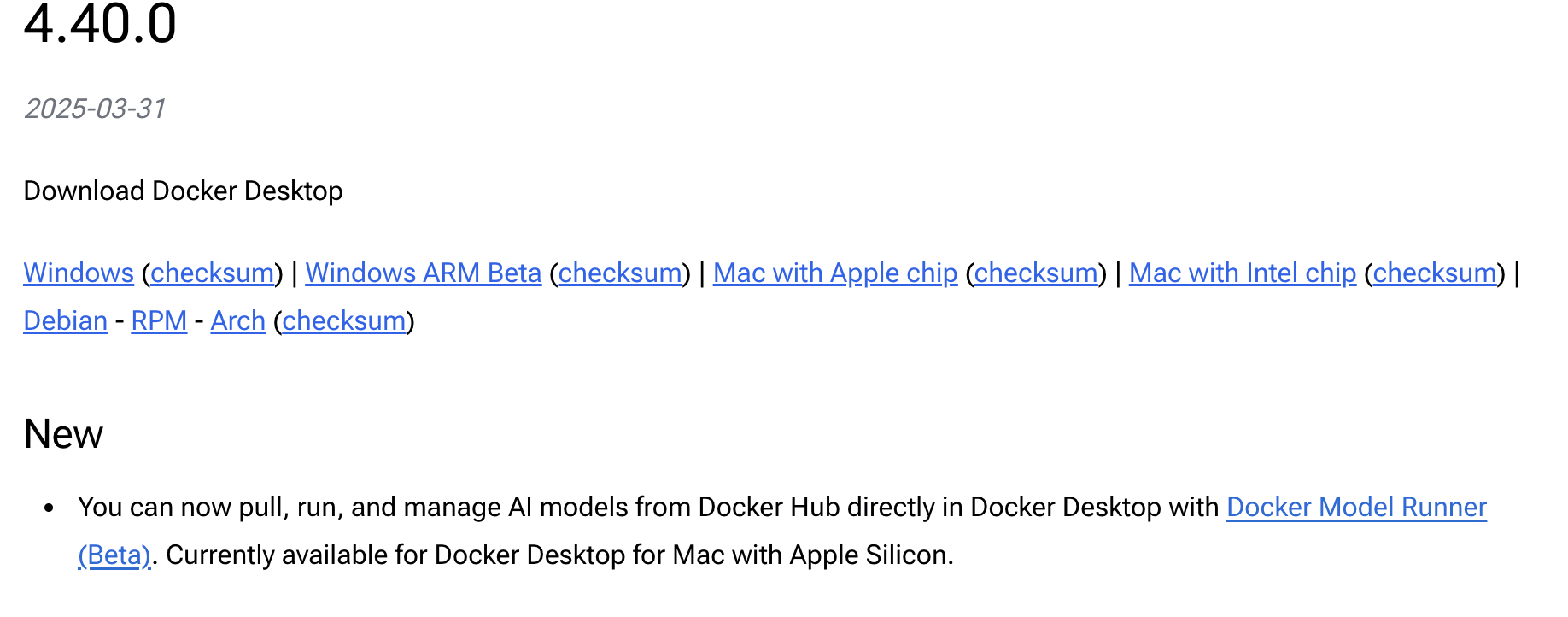
 Docker 在其最新的 4.44.0 版本中引入了 Docker Model Runner 功能,使在本地环境中运行 AI 模型变得简单和便捷。
**当前平台支持情况**:目前,Docker Model Runner 仅在搭载 Apple Silicon 芯片(M 系列)的 Mac 设备上可用。Windows 平台的支持已在 Docker 的开发路线图上,将在未来版本中推出。正如官方所述:"Soon, this will also be available on Windows."
这项功能的推出标志着 Docker 向 AI 开发领域迈出了重要一步,为开发者提供了一种无需配置复杂环境就能轻松管理和运行大型语言模型的方式,同时避免了对外部云服务的依赖。
Docker 在其最新的 4.44.0 版本中引入了 Docker Model Runner 功能,使在本地环境中运行 AI 模型变得简单和便捷。
**当前平台支持情况**:目前,Docker Model Runner 仅在搭载 Apple Silicon 芯片(M 系列)的 Mac 设备上可用。Windows 平台的支持已在 Docker 的开发路线图上,将在未来版本中推出。正如官方所述:"Soon, this will also be available on Windows."
这项功能的推出标志着 Docker 向 AI 开发领域迈出了重要一步,为开发者提供了一种无需配置复杂环境就能轻松管理和运行大型语言模型的方式,同时避免了对外部云服务的依赖。
 ## 可用命令整理
### 查看 Model Runner 状态
检查 Docker Model Runner 是否处于活动状态:
```bash theme={null}
docker model status
```
### 查看所有命令
显示帮助信息和可用子命令列表:
```bash theme={null}
docker model help
```
输出:
```text theme={null}
Usage: docker model COMMAND
Commands:
list 列出本地可用的模型
pull 从 Docker Hub 下载模型
rm 删除已下载的模型
run 以交互方式或使用提示运行模型
status 检查模型运行器是否正在运行
version 显示当前版本
```
### 拉取模型
## 可用命令整理
### 查看 Model Runner 状态
检查 Docker Model Runner 是否处于活动状态:
```bash theme={null}
docker model status
```
### 查看所有命令
显示帮助信息和可用子命令列表:
```bash theme={null}
docker model help
```
输出:
```text theme={null}
Usage: docker model COMMAND
Commands:
list 列出本地可用的模型
pull 从 Docker Hub 下载模型
rm 删除已下载的模型
run 以交互方式或使用提示运行模型
status 检查模型运行器是否正在运行
version 显示当前版本
```
### 拉取模型
 从 Docker Hub 拉取模型到本地环境:
```bash theme={null}
docker model pull
```
示例:
```bash theme={null}
docker model pull ai/deepseek-r1-distill-llama
```
输出:
```text theme={null}
Downloaded: 257.71 MB
Model ai/deepseek-r1-distill-llama pulled successfully
```
### 列出可用模型
列出当前拉取到本地环境的所有模型:
```bash theme={null}
docker model list
```
您将看到类似以下内容:
```text theme={null}
MODEL PARAMETERS QUANTIZATION ARCHITECTURE MODEL ID CREATED SIZE
ai/deepseek-r1-distill-llama 361.82 M IQ2_XXS/Q4_K_M llama 354bf30d0aa3 1 days ago 256.35 MiB
```
### 运行模型
运行模型并使用提交的提示或聊天模式与其交互。
#### 一次性提示
```bash theme={null}
docker model run ai/deepseek-r1-distill-llama "Hi"
```
输出:
```text theme={null}
Hello! How can I assist you today?
```
#### 交互式聊天
```bash theme={null}
docker model run ai/deepseek-r1-distill-llama
```
输出:
```text theme={null}
Interactive chat mode started. Type '/bye' to exit.
> Hi
Hi there! It's SmolLM, AI assistant. How can I help you today?
> /bye
Chat session ended.
```
### 删除模型
从系统中移除已下载的模型:
```bash theme={null}
docker model rm
```
输出:
```text theme={null}
Model removed successfully
```
## 使用 Rest 端点
从 Docker Desktop GUI 或通过 Docker Desktop CLI 启用主机端 TCP 支持。
使用 `docker desktop enable model-runner --tcp `。
之后,可以使用 `localhost` 和所选或默认端口与其交互:
```bash theme={null}
curl http://localhost:12434/engines/llama.cpp/v1/chat/completions \
-H "Content-Type: application/json" \
-d '{
"model": "ai/deepseek-r1-distill-llama",
"messages": [
{
"role": "system",
"content": "You are a helpful assistant."
},
{
"role": "user",
"content": "Please write a summary about Docker."
}
]
}'
```
## LangChain4j 调用 Docker Model
[LangChain4j](https://github.com/langchain4j/langchain4j) 是一个 Java 框架,用于构建基于大型语言模型 (LLM) 的应用程序。它为 Java 开发人员提供了与各种 LLM 交互的简单方式,类似于 Python 世界中流行的 LangChain 库。
### 设置步骤
#### 1. 确保 Docker Model Runner 已启用
在 Docker Desktop 中确保 Model Runner 功能已启用(见前文)。
#### 2. 添加 LangChain4j 依赖
在您的 Java 项目的`pom.xml`文件中添加以下依赖:
```xml theme={null}
dev.langchain4j
langchain4j
1.0.0-beta2
dev.langchain4j
langchain4j-open-ai
1.0.0-beta2
```
#### 3. 拉取并运行所需模型
使用前文介绍的命令拉取模型:
```bash theme={null}
docker model pull ai/deepseek-r1-distill-llama
```
#### 4. 配置 LangChain4j 连接到本地模型
创建一个配置类来连接到 Docker Model Runner:
```java theme={null}
import dev.langchain4j.model.chat.ChatLanguageModel;
import dev.langchain4j.model.openai.OpenAiChatModel;
public class ModelConfig {
public ChatLanguageModel chatLanguageModel() {
return OpenAiChatModel.builder()
.baseUrl("http://localhost:12434/engines/llama.cpp/v1")
.modelName("ai/deepseek-r1-distill-llama")
.temperature(0.7)
.build();
}
}
```
### 示例应用
下面是一个使用 LangChain4j 与 Docker Model Runner 的简单示例:
```java theme={null}
public class DockerModelExample {
interface Assistant {
String chat(String message);
}
public static void main(String[] args) {
// 创建模型配置
ModelConfig config = new ModelConfig();
ChatLanguageModel model = config.chatLanguageModel();
// 创建 AI 服务
Assistant assistant = AiServices.builder(Assistant.class)
.chatLanguageModel(model)
.build();
// 进行对话
String response = assistant.chat("用 Java 编写一个简单的 Hello World 程序");
System.out.println(response);
}
}
```
### 总结
提起来 Docker Model Runner ,那必须要与 Ollama 的对比,这两个工具都致力于简化本地 AI 模型的运行管理,但在技术实现和适用场景上存在显著差异。Docker Model Runner 深度集成于 Docker 生态,而 Ollama 则是独立的模型运行工具。
| 特性 | Docker Model Runner | Ollama |
| ---------- | --------------------------------------------- | --------------------------- |
| **开发状态** | Beta,2025 年 4 月 1 日仍在测试 | 成熟开源工具,已广泛使用 |
| **操作系统支持** | 主要支持 macOS(Apple Silicon),Windows NVIDIA 即将支持 | macOS、Linux、Windows,跨平台支持更广 |
| **模型来源** | 从 Docker Hub 拉取,缓存本地 | 支持官方库和自定义导入(如 GGUF),更灵活 |
| **定制能力** | 暂未公布构建模式 | 通过 `Modelfile` 支持深度定制,功能更强 |
| **API 集成** | OpenAI 兼容 API,适合 Docker 生态 | REST API 和 Python 库,集成更广泛 |
| **易用性** | 适合 Docker 用户,CLI 集成紧密 | 独立工具,适合非 Docker 用户,界面更简单 |
从 Docker Hub 拉取模型到本地环境:
```bash theme={null}
docker model pull
```
示例:
```bash theme={null}
docker model pull ai/deepseek-r1-distill-llama
```
输出:
```text theme={null}
Downloaded: 257.71 MB
Model ai/deepseek-r1-distill-llama pulled successfully
```
### 列出可用模型
列出当前拉取到本地环境的所有模型:
```bash theme={null}
docker model list
```
您将看到类似以下内容:
```text theme={null}
MODEL PARAMETERS QUANTIZATION ARCHITECTURE MODEL ID CREATED SIZE
ai/deepseek-r1-distill-llama 361.82 M IQ2_XXS/Q4_K_M llama 354bf30d0aa3 1 days ago 256.35 MiB
```
### 运行模型
运行模型并使用提交的提示或聊天模式与其交互。
#### 一次性提示
```bash theme={null}
docker model run ai/deepseek-r1-distill-llama "Hi"
```
输出:
```text theme={null}
Hello! How can I assist you today?
```
#### 交互式聊天
```bash theme={null}
docker model run ai/deepseek-r1-distill-llama
```
输出:
```text theme={null}
Interactive chat mode started. Type '/bye' to exit.
> Hi
Hi there! It's SmolLM, AI assistant. How can I help you today?
> /bye
Chat session ended.
```
### 删除模型
从系统中移除已下载的模型:
```bash theme={null}
docker model rm
```
输出:
```text theme={null}
Model removed successfully
```
## 使用 Rest 端点
从 Docker Desktop GUI 或通过 Docker Desktop CLI 启用主机端 TCP 支持。
使用 `docker desktop enable model-runner --tcp `。
之后,可以使用 `localhost` 和所选或默认端口与其交互:
```bash theme={null}
curl http://localhost:12434/engines/llama.cpp/v1/chat/completions \
-H "Content-Type: application/json" \
-d '{
"model": "ai/deepseek-r1-distill-llama",
"messages": [
{
"role": "system",
"content": "You are a helpful assistant."
},
{
"role": "user",
"content": "Please write a summary about Docker."
}
]
}'
```
## LangChain4j 调用 Docker Model
[LangChain4j](https://github.com/langchain4j/langchain4j) 是一个 Java 框架,用于构建基于大型语言模型 (LLM) 的应用程序。它为 Java 开发人员提供了与各种 LLM 交互的简单方式,类似于 Python 世界中流行的 LangChain 库。
### 设置步骤
#### 1. 确保 Docker Model Runner 已启用
在 Docker Desktop 中确保 Model Runner 功能已启用(见前文)。
#### 2. 添加 LangChain4j 依赖
在您的 Java 项目的`pom.xml`文件中添加以下依赖:
```xml theme={null}
dev.langchain4j
langchain4j
1.0.0-beta2
dev.langchain4j
langchain4j-open-ai
1.0.0-beta2
```
#### 3. 拉取并运行所需模型
使用前文介绍的命令拉取模型:
```bash theme={null}
docker model pull ai/deepseek-r1-distill-llama
```
#### 4. 配置 LangChain4j 连接到本地模型
创建一个配置类来连接到 Docker Model Runner:
```java theme={null}
import dev.langchain4j.model.chat.ChatLanguageModel;
import dev.langchain4j.model.openai.OpenAiChatModel;
public class ModelConfig {
public ChatLanguageModel chatLanguageModel() {
return OpenAiChatModel.builder()
.baseUrl("http://localhost:12434/engines/llama.cpp/v1")
.modelName("ai/deepseek-r1-distill-llama")
.temperature(0.7)
.build();
}
}
```
### 示例应用
下面是一个使用 LangChain4j 与 Docker Model Runner 的简单示例:
```java theme={null}
public class DockerModelExample {
interface Assistant {
String chat(String message);
}
public static void main(String[] args) {
// 创建模型配置
ModelConfig config = new ModelConfig();
ChatLanguageModel model = config.chatLanguageModel();
// 创建 AI 服务
Assistant assistant = AiServices.builder(Assistant.class)
.chatLanguageModel(model)
.build();
// 进行对话
String response = assistant.chat("用 Java 编写一个简单的 Hello World 程序");
System.out.println(response);
}
}
```
### 总结
提起来 Docker Model Runner ,那必须要与 Ollama 的对比,这两个工具都致力于简化本地 AI 模型的运行管理,但在技术实现和适用场景上存在显著差异。Docker Model Runner 深度集成于 Docker 生态,而 Ollama 则是独立的模型运行工具。
| 特性 | Docker Model Runner | Ollama |
| ---------- | --------------------------------------------- | --------------------------- |
| **开发状态** | Beta,2025 年 4 月 1 日仍在测试 | 成熟开源工具,已广泛使用 |
| **操作系统支持** | 主要支持 macOS(Apple Silicon),Windows NVIDIA 即将支持 | macOS、Linux、Windows,跨平台支持更广 |
| **模型来源** | 从 Docker Hub 拉取,缓存本地 | 支持官方库和自定义导入(如 GGUF),更灵活 |
| **定制能力** | 暂未公布构建模式 | 通过 `Modelfile` 支持深度定制,功能更强 |
| **API 集成** | OpenAI 兼容 API,适合 Docker 生态 | REST API 和 Python 库,集成更广泛 |
| **易用性** | 适合 Docker 用户,CLI 集成紧密 | 独立工具,适合非 Docker 用户,界面更简单 |